Frequently Asked Questions
How long is a PAC code valid?
What is the PAC replacement process?
Why are there so many SIM card variants to choose from when placing a stock order in JEM?
What do the different SIM types in JEM mean and how should they be used?
What is an eSIM?
Which iPhones are compatible with an eSIM?
How do I connect a watch plan?
How do I locate my tracking reference for an order?
Do you have any videos to help me use the JEM portal?
How do I locate a customer’s account number with EE?
How do I raise a stock request?
What does 'migration' mean?
Is there a cost for changing an existing mobile number on EE?
How do I request a number change?
What is a CAT or account transfer, and when is it required?
My customer’s device has developed a fault how do I support my customer to secure a replacement?
How do I request a report showing contract end dates for my customer?
How do I build a quote for my customer in the JEM portal?
How do I request a PAC code or a termination of a mobile number on a customer’s EE account?
My customer is in the UK and experiencing signal issues, what can I do to assist them?
My customer has advised their device isn’t working correctly, what can I do to assist them?
My customer is roaming and is unable to use their device what can I do to assist them?
My customer is going abroad, can you assist me with what roaming bundles are available to the user?
I’m a small business customer, why am I unable to call 084 and 087 numbers?
I have a BT Engineer appointment, what should I expect and how should I prepare?
How do I request a tariff change for my customer on EE?
What is the BT Cloud Voice order journey?
How long does it take to process a BT Cloud Voice order?
My customer has ordered equipment as part of their Cloud Voice order. When will they receive this?
EE Mobile Manager – How can I locate unbilled usage information?
How does my customer get access to EE Online Billing?
How is an EE port processed, what should I expect to see happen, and what are the timescales to allow me to guide my customer? How do I check what segment my customer is on from a JEM quote?
What is a PAC code?
If you're new to EE and want to keep your number from your old provider, you'll need a PAC code from them to use your old number with EE. Alternatively, if you're leaving EE to switch to a new provider, you'll need your PAC code to take your number with you.

How long is a PAC code valid?
A PAC code is valid for 30 days. If you do not use your PAC within that timescale, your account with your provider will stay open and you'll be charged for your service as normal.
If the 30 days has elapsed, you will need to request a new PAC code.
What is the PAC replacement process?
EE has a process that partners can follow which allows your business customer to request a PAC code for a number on their account. This process can be used to allow a user to take a number from a business account and leave EE without paying the remaining contract charges.
The business must replace the line that is leaving the network with a new connection. The new connection will then fulfil the remaining contract tenure of the line that is porting out.
This is a non-commissionable event and can only be used as a replacement to a line that is leaving.
The request can only be considered if it meets the new EE criteria as from 03.06.24.
PAC replacement information is outlined below and applies to SMB (Small and Medium Business) and Corporate connections across all technology stacks:
- Final Commitment Period: The connection must be within the final 8 months of its commitment period.
- Business Rationale: If the connection is not within the final 8 months, a compelling business rationale will be required to justify the line replacement.
- Approval Process: All PAC replacement requests require both EE operational and commercial approval. These requests should be submitted to Mdee BAU. We will then request consideration and approval from EE.
Why are there so many SIM card variants to choose from when placing a stock order in JEM?
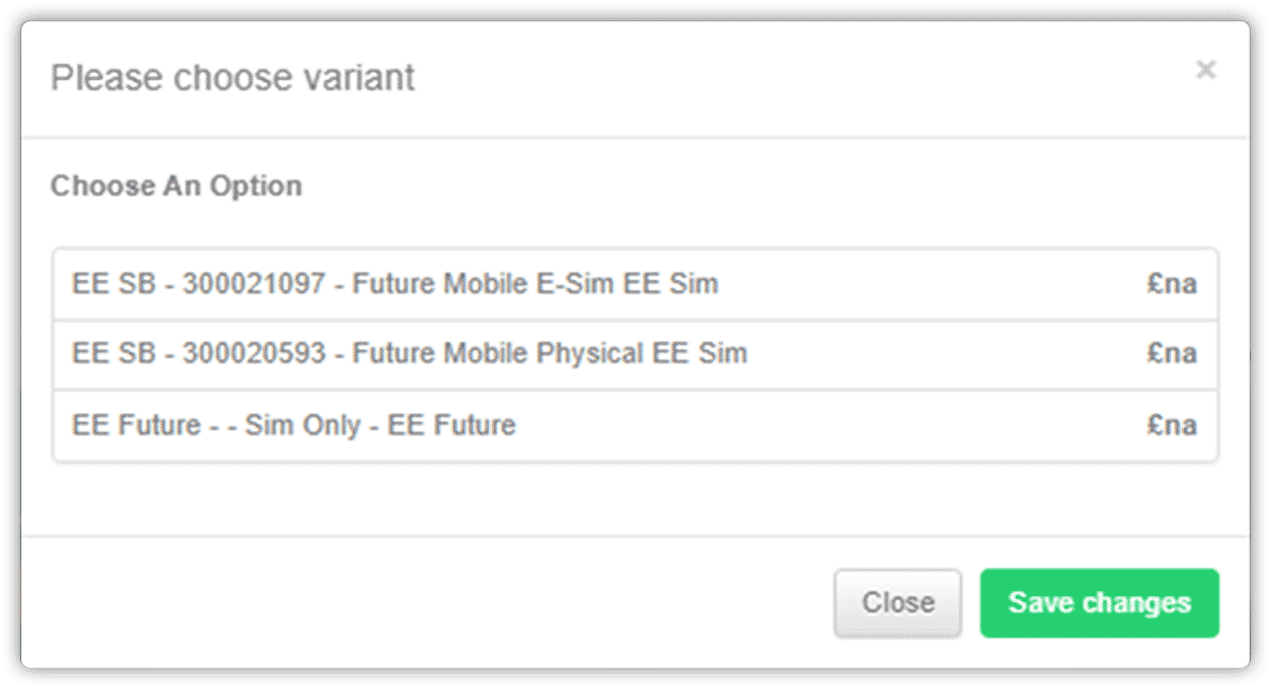
Within our JEM stock ordering system there are multiple SIM types that you can select from based on both the customer and connection type that you wish to connect to EE.
The screen shots below show the various SIM types available to select from:

What do the different SIM types in JEM mean and how should they be used?
Small Business Customers
EE SB – 300011734 – EE PAYM Multi Sim
This SIM card should be used for small business customers who are taking a new or additional connection.
EE SB – 300012136 – EE Rep Multi Sim
This SIM card should be used for small business customers who require a replacement SIM card and wish to carry out a SIM swap.
EE SB – 300019284 – PAYM E-Sim
This SIM card should be used for small business customers who require a new or additional eSIM connection.
EE SB – 300019286 – Rep E-Sim
This SIM card should be used for small business customers who require a replacement eSIM card and wish to carry out a SIM swap.
Corporate Business Customers
EE Corp – 300022004 – EE New Connection e-SIM (Corporate)
This SIM card is used for a corporate customer who wishes to take a new or additional connection on an eSIM.
EE Corp – EEB2BP60PP – EE PAYM 4G Multi Sim
This SIM card is used for a corporate customer who wishes to take a standard SIM card for a new or additional connection.
EE Corp – EEB2BP60NPP – EE Rep Multi Sim
This SIM card is used for a corporate customer who requires a replacement SIM card and wishes to carry out a SIM swap.
EE Corp – 300022005 – EE Replacement e-Sim (Corporate)
This SIM card is used for a corporate customer who requires a replacement eSIM card and wish to carry out a SIM swap.
EE SB – 300021097 – Future Mobile E-Sim EE Sim
This SIM card is used for a customer who is taking a Future Mobile tariff specifically and requires an eSIM for new and additional connections only.
EE SB – 300020593 – Future Mobile Physical EE Sim
This SIM card is used for a customer who is taking a Future Mobile tariff specifically and requires a physical SIM card for new and additional connections only.
What is an eSIM?
eSIMs work just like a traditional SIM card but they’re embedded in the device so they can’t be removed. An eSIM includes everything you need to connect to the EE network.
Instead of a physical SIM, customers who are connecting a new connection on an eSIM card will be sent a QR code. They simply scan the QR code to download their SIM profile to their phone.
If the customer is already connected to the EE network and wishes to move from a physical SIM to an eSIM, they need to order the correct eSIM type on JEM. Once this is received, they must request a SIM swap to the new SIM card. Once the SIM swap is completed and confirmed as such, the customer then scans the QR code provided.
Which iPhones are compatible with an eSIM?
All iPhone models from XS onwards.
How do I connect a watch plan?
Watch tariffs are available in our indirect channel. Please click here to view the guide.
How do I locate my tracking reference for an order?
Please click here for a step by step guide to locate your tracking reference for an order.
Your parcel may be sent by Royal Mail or APC. Please find links to their websites for tracking your parcels below:
Royal Mail: https://www.royalmail.com/track-your-item
APC: https://apc-overnight.com/receiving-a-parcel/tracking
Do you have any videos to help me use the JEM portal?
We have multiple videos on this Portal, click here for further information.
How do I locate a customer’s account number with EE?
If you have already created the customer in JEM and have processed previous quotes/orders, the customer’s account number can generally be located within the quote ticket notes or in the customer record. To check the customer record, when in the quote, select ‘overview’ and then ‘edit’ on company type. This will display the customer record where the account number field is in the bottom right. This is relatively new functionality so not all account numbers have been populated. Please help update JEM by entering this if blank.
Alternatively, your customer can provide you with their EE account number from the EE bill they have received from the network. The account number is generally located on the first page of the customer’s bill.
If you have access to your customer’s billing on Mobile Manager, the account number can also be located from the billing information within the Portal.
What does 'migration' mean?
The term 'migration' refers to when an existing EE customer wishes to change their current segment type, for example, moving from small business to corporate or vice versa.
Please speak to the Sales team should you wish to discuss this further, as EE has specific criteria that the customer must meet for this to be considered.
Is there a cost for changing an existing mobile number on EE?
EE will allow one number change per user free of charge.
If that user wishes to change their number again, EE will charge the below directly to the customer’s account.
- Small business customers: £35.75 per change.
- Corporate business customers: £12 per change.
How do I request a number change?
Please raise a general query ticket on JEM providing the full business name of the customer and the mobile number that you require to be changed. You must also specify if this is the first change request or a chargeable request. If chargeable, you must confirm that the account holder accepts the charge.
What is a CAT or account transfer, and when is it required?
A CAT, a Customer Account Transfer, occurs when the type of account currently held requires a change.
Examples of this may be:
- An existing consumer on EE wishes to change their account from consumer to a business account.
- An existing business customer on EE wishes to change their current business name to a new business name.
In both above examples, the new business name that the account wishes to be used will require a credit check to be completed. A credit check can be completed on our JEM system, noting that this is a customer account transfer request.
If you would like to upgrade the number, the business account will need to be eligible to have the amount of lines required. Therefore, you will need to advise the team to credit check the account.
The number also needs to be in the last 30 days of its contract. You will need to raise an upgrade quote with a completed CAT form attached to proceed.
Please note, if the number has an active PAC or you have been given an 'ONE' PAC code, we will not be able to proceed until the PAC has been removed as we cannot port a number that is already on EE to EE.
The link below takes you to the relevant form on the Mdee Partner Portal which must be completed in full. Once completed, please either attach this to the credit check request, or alternatively, once the credit check is passed and the customer is ready to proceed, raise a general query ticket on JEM for this to be processed.
View EE Business Change of Ownership Transfer Form
Should you have any further questions, please contact the ConnectMee team for further information.
My customer’s device has developed a fault how do I support my customer to secure a replacement?
If the device has developed a fault within the first 30 days of supply, please contact MDEE and we will provide additional information on how we can support you.
If a device develops a fault outside of the first 30 days, the customer in the first instance must complete a diagnostic check with EE. EE will carry out the necessary checks to determine if the device is faulty.
If the equipment is EE branded stock and EE have confirmed the device is faulty, EE will arrange a replacement, apart from for Apple devices which are managed as per the below.
- An Apple device that is in the first year of warranty/connection: the customer must contact Apple directly for support.
- An Apple device in the second year of warranty/connection: the customer must contact EE directly to request a diagnostic check and replacement if diagnosed as faulty.
How do I request a report showing contract end dates for my customer?
We can request a looking glass report from the network. This report will show the mobile numbers that are active on the customer’s account, username information (where applicable) the present tariff code, the contract start and end date for each line.
To request a looking glass report please raise a general query ticket on JEM providing the customer’s full business name, the customer’s existing EE account number and that a looking glass report is required.
How do I build a quote for my customer in the JEM portal?
For small business customers, please see this guide.
And for corporate customers, please see this guide.
Should you require any further assistance please contact the sales team on 0115 940 3900, option 1.
How do I request a PAC code or a termination of a mobile number on a customer’s EE account?
On a corporate customer account, we can request a PAC code or disconnection on your behalf.
To request this, please follow the link below. The form will need to be downloaded and completed in full. Once completed, please add as a general query ticket on JEM. The network standard SLA for reviewing and responding to any request is a minimum of 5 working days.
Click here to view EE Corporate Disconnection Form.
On a small business customer account, we are unable to request a PAC code or disconnection. EE will only accept any request directly from the account holder who must call EE business customer services directly to request. They can dial 150 from their EE connection or alternatively 07953 966250 from a landline.
My customer is in the UK and experiencing signal issues, what can I do to assist them?
Check the postcode location in which the user is experiencing the issues by following the below link to the EE website and network status checker:
https://coverage.ee.co.uk/coverage/ee
Enter the postcode location, the device type that the customer is using and click on the CHECK STATUS button.
The system will return any known issues in the postcode location. You also have the option to enter a mobile number or email address that you would like to receive alerts to as the issue progresses.
My customer has advised their device isn’t working correctly, what can I do to assist them?
Below are some questions to ask your customer to assist:
- Is the device displaying any bars showing that they have signal?
- If not, have you completed a network status check on the EE website to see if there are any known network outages? https://coverage.ee.co.uk/coverage/ee
- Has the user received any error messages? If so, what are they?
- Has the user tried using their SIM card in a different device and what was the outcome?
- Has the customer carried out a full hardware reset?
- What is the user experiencing e.g. unable to use data, unable to make or receive calls, unable to send or receive texts etc.?
If the issue persists and you require Mdee’s assistance, please raise a general query ticket on JEM providing the below information. We can then carry out some initial checks with EE:
- The full business name of the customer
- The mobile number that is experiencing the issue
- Handset IMEI number
- SIM card number in use
- The customer’s current postcode location
- Then a short summary of what checks you have completed and the outcome
My customer is roaming and is unable to use their device what can I do to assist them?
Make sure that the customer has checked that they have roaming enabled on their device and it is switched on.
Check that the customer has gone into the settings of their device to attempt to manually select the network for roaming.
Check that the customer has switched their device off upon arriving in their country of travel and switched the device back on, completing a full reboot.
If above checks have failed to resolve the issue, please raise a query ticket on JEM.
Within the ticket you will need to provide:
- The full business name of the customer
- The mobile number of the affected user
- The country that user is currently travelling in
- What is being experienced, e.g. unable to use data, unable to make or receive calls, unable to send or receive messages or that the device is not working at all for any services
The team will then call through to the network and complete some checks on your behalf. The ticket will be updated with the outcome.
My customer is going abroad, can you assist me with what roaming bundles are available to the user?
We recommend that we complete an initial check on your behalf with the network as to what tariff you customer is currently on and what bundles they already have applied to the line in question.
To request assistance, please raise a general query ticket on JEM providing:
- The full business name of the customer
- The mobile number in question
- What country the customer is travelling to
- What type of bundle they wish to add, e.g. to make calls, send texts, use data or all of these, etc.
I’m a small business customer, why am I unable to call 084 and 087 numbers?
A premium bar may be in place on the line that is unable to make the calls. We can check this with the network. Please raise a general query ticket on JEM to allow us to check this for you. If a bar is in place, we can request that the network remove this.
Please ensure that the customer is aware of the costs associated when calling the numbers with this prefix: full details can be found in the price guide on the MDEE Partner Portal.
The network has a bundle for small business customers that can be requested providing 200 minutes per month at £5.70 per month (this may be subject to change, please check EE literature for current information).
Should you require a bar to be removed and any bundle added please provide:
- The full business name of the customer
- The mobile number in question
- Details of any action you would like us to take
I have a BT Engineer appointment, what should I expect and how should I prepare?
Please see guidance from BT below:
When will your engineer arrive?
Your appointment is scheduled for XDate between 08:00 and 13:00 or 13:00 and 18:00. Please note that our supplier does not give us an exact time when your engineer will visit.
AM Appointment:
An engineer can arrive anytime between 08:00 and 13:00.
You may be contacted directly by your engineer, so keep an eye out for any calls or texts and/or emails. The inbound number will display as 0800 328 9393 or in some cases will show as a private number.
PM Appointment:
An engineer can arrive anytime between 13:00 and 18:00.
You may be contacted directly by your engineer, so keep an eye out for any calls or texts and/or emails. The inbound number will display as 0800 328 9393 or in some cases will show as a private number.
Pre-checks for customer/partner:
What should you do prior to the installation?
- Make sure you’ve chosen the best date and time.
If you need to rearrange, you can do so up to 72 hours before your engineer's visit. - Get permission from the property owner / landlord for possible engineering work.
For example, the engineer may need to carry out drilling or secure ladders/scaffolding - Make sure you have a power socket near to where you want us to install your equipment.
- Make sure you have a decision maker on-site for the whole engineer visit – and provide their contact details to the engineer.
It’s important that the engineer can get in touch if they need to. Engineer visits usually take two hours or longer.
Whilst the engineer is on site:
What should you do on the day of the installation?
- Clear a space where you want your equipment installed.
- Make sure there are no hazards on site or access restrictions that could stop the engineer from completing their work.
- Give the engineer access to anywhere they need to work.
- For example they may need to drill holes for a cable to access your property or to secure ladders to your external walls.
Missed Appointment:
If you miss an engineer’s visit or if the engineer turns up and your site isn’t ready for the engineer, you may need to pay a missed appointment charge. Missing a visit also causes delays. It’s important you change or cancel an engineer visit at least 48 hours in advance if the time isn’t convenient.
How do I request a tariff change for my customer on EE?
Please raise a general support ticket on our JEM system. To request a tariff change we require:
- Full business name of the customer
- Mobile number that the tariff change relates to
- The new tariff name you would like the customer changing to. Please include the EE tariff product code and monthly cost (all of which can be located in the MDEE Price Guide on the Partner Portal)
Should you require any assistance with what tariff would be suitable for your customer, please contact the sales team directly and they will be happy to assist.
What is the BT Cloud Voice order journey?
Mdee process fully completed Cloud Voice Order requests within 24 hours of receipt.
We will notify you when the order has been processed and continue to keep you updated as the customer order progresses with BT.
Mdee build the order received. Once completed on BT systems, an electronic contract is then sent to your customer to sign. This will be sent by email to your customer to the email address that you have provided.
If number ports are required, an LOA (Letter of Authority) will be sent to the customer for signature to allow the order to proceed.
To process a Cloud Voice order, the customer must connect/have one of the below:
- A new broadband being supplied by BT
- An existing BT broadband on site
- An existing 3rd party broadband on site
If the customer is coming from a 3rd party provider and wishes to keep their existing number, and is having BT broadband installed then we must install a new socket inside the property. This is to avoid the customer’s number being lost, or there being a period with no internet connection.
If the customer is taking a new BT broadband connection, the order will be submitted to BT once the Cloud Voice contract is signed and the order is in progress.
If the customer has an existing BT broadband connection, the line number must be provided on your order form.
If the customer is going to use an existing 3rd party broadband, the line number and provider details must be provided. On orders of this type, the customer needs to pass an OTT test on site and provide the reference. Details of how to do this will be provided if this access is required.
How long does it take to process a BT Cloud Voice order?
BT will process the order within 5 working days, with the aim of completing the project within 2-3 weeks. The timescale may vary depending on the order type. We will keep you updated throughout the process.
If the order is for 3 licences, this will involve minimal phone contact from BT as they are processed by the low licence team. The customer will typically be emailed updates and will be called if there are any urgent queries.
Please note that some orders will fall into ‘complex validation’. There are many reasons an order can be categorised into this status – generally if a port is required, if it is a multi-line port, or if the port is coming from another provider.
The complex validation order journey timescale can vary depending on the nature of the order. Mdee will monitor your order throughout and engage with BT daily for updates. We will contact you directly to provide updates as the order progresses.
Once the order is validated and accepted, a link will be emailed from BT to your customer inviting them to book a welcome call (4+ licences).
The welcome call will involve a member of the BT Cloud Voice team discussing the details with the customer to ensure they are correct and arranging a suitable completion date.
During the discussion, BT will cover the required port date, and engineer installation date. A copy of the discussion will be sent to the customer after the call.
Low licence orders will receive an email confirming the details above instead, although they may still receive a call too.
My customer has ordered equipment as part of their Cloud Voice order. When will they receive this?
The equipment will be sent to the customer approximately 1 week before the order is due to be completed. They will be required to install their handsets in advance of the completion date to enable BT to check they are working correctly. If an engineer visit has been ordered, then the engineer will do this for them.Mdee will keep you updated with regards to what dates have been booked and agreed. We will remind you 48 hours in advance of the appointment to ensure the customer is prepared.
Common identified issues that may cause a delay in order delivery and completion:
- The business name details provided on the BT order form must be the full business name of the customer. Failure to provide this information correctly may result in the Cloud Voice contract being issued with the wrong business name. A reissue will then be required.
- If the customer is connecting their Cloud Voice to their existing 3rd party broadband, the order cannot be submitted until the OTT test has passed and reference is provided. Our Mdee support team will talk you through this process as part of the order management.
- If the customer requires a number port, please provide the current provider billing account reference on your order form.
- A port request can, on occasion, be delayed due to the existing provider not releasing the number. We will continue to monitor and secure updates from BT on progress. However, the order will not proceed until the existing provider responds. The customer can speak directly to their existing provider to speed up the response to assist the process.
Does the customer require an 03/09/08 number? They need to call 0800 808 800. Once this has been organised, please contact the Cloud Voice Help Desk to set up a divert to this number.
EE Mobile Manager – How can I locate unbilled usage information?
Please see EE's Mobile Manager Guide here.
How does my customer get access to EE Online Billing?
My EE online billing platform (less than 5 connections)
My EE is a self-serve platform. Please advise your customer to follow the below link to register: https://business.ee.co.uk/help/my-ee/.
EE will send an email to the customer with a link to verify their address and confirm their account. The customer can then create their login/password to access billing information.
EE Mobile Manager online billing platform (criteria 5 or more connections)
If you require your customers to be set up for Mobile Manager, please email bps.communications@ee.co.uk with the following information:
- EE account number
- Company name
- Full name of the person within the business requiring access
- Email address of the person requiring access
Please ask at point of submission that the customer is added to your partner profile, providing your EE connector code.
For partner access, if you don’t already have a master login to view your accounts, please email bps.communications@ee.co.uk and provide the below details for the employees you’d like to enrol as authorised users:
- Partner name and EE connector code
- Employee first name
How is an EE port processed, what should I expect to see happen, and what are the timescales to allow me to guide my customer?
Please refer to this document which covers this information.
How do I check what segment my customer is on from a JEM quote?
To check what segment a number in on, please follow the below steps from the home page in JEM.
Search orders, change search field to CLI and enter the mobile number. Click View on the order line and then view quote.
From the quote screen, click Overview and the NETWORK (segment) is displayed on the top line.
If you don’t have a mobile number (CLI) you can search by quote ID or customer name to find an applicable quote and the above steps still apply.